HTC Desire Z screenshots on Android 2.3, the long way round
Contents
How hard is it to get a picture of a phone's screen when you have root on the phone, its bootloader unlocked and a keyboard attached? I needed a few screenshots of MeshLauncher, the home-screen app I had just written for my HTC Desire Z, a 2010 Android slider with a four-row keyboard that I'm rebuilding around software of my own. It runs CyanogenMod 7, the community build of Android 2.3, and on that ROM the honest answer is: hard enough that I ended up signing my app with Google's published platform key. Phones that refuse simple requests get my full attention, which has never once been good news for the phone or for my evening.
This post is the whole chase: the screenshot tools that did nothing, the raw framebuffer dumps that came out as modern art, a root toast that burned itself into every capture, a permission named after exactly what I wanted that grants none of it, and the chmod that finally worked. It took a little over two and a half hours of one night, a factory reset included, and then it broke again after a reflash. The ending is not the one I would have picked.
What Android 2.3 gives you for screenshots#
Not much. adb shell screencap answers screencap: not found. CyanogenMod adds two things of its own: a "Screenshot" item in the power menu and a 5,584-byte binary at /system/bin/screenshot. I gave the binary a path to write to every way I could think of, with and without root. It exited 0 every time and the file I had named never appeared. The power-menu item produced nothing I could find, and a broadcast to the CyanogenMod screenshot app came back Broadcast completed: result=0, which on this phone means the message was delivered and tells you nothing about whether anyone acted on it. Nobody had.
I filed the binary as a dead stub and moved on. The phone had no SD card in it when I tried the binary, and I had been looking for the file I asked for rather than the one the binary writes. That verdict was wrong, and it falls apart later in the series, in the journal app post. For this night it was dead, and I built around the corpse.
Downloading an old screenshot app went no better: the APK mirrors I tried answered with HTML pages instead of APKs. So I went back to the pixels.
Reading /dev/graphics/fb0 from the laptop#
The screen's contents live in the framebuffer, the kernel device at /dev/graphics/fb0 that holds the pixels the display shows. Its geometry is in sysfs: virtual_size reads 480,1600, bits_per_pixel reads 32, stride reads 1920. That is a 480-pixel-wide screen, 4 bytes per pixel, with room for two 800-line frames stacked on top of each other. One frame is 480 × 800 × 4 = 1,536,000 bytes.
I piped the device through adb shell cat to the laptop, cut off the first 1,536,000 bytes and fed them to ImageMagick as BGRA. Washed out. As RGBA: horizontal stripes, colours from somewhere else. A Python loop swapping the channels left the black background green. I put it down to the GPU writing some non-standard pixel format and to tearing, a read racing the display halfway through a frame flip. Both explanations were confident, specific and unproven, which is my favourite combination at that hour and the most expensive one.
The launcher reads the framebuffer itself#
Plan B: let the launcher take its own screenshot. I added Fn+S to MeshLauncher: read fb0, convert the pixels, save a PNG. Fn+S saved nothing, and two lines explained why:
crw-rw----    1 root     graphics   29,   0 May 16 22:49 /dev/graphics/fb0
app_0     2081  1239  115924 23888 ffffffff afd0c75c S com.mesh.launcher
The device node is readable by root and the graphics group only. My app ran as app_0, an ordinary app user, in neither. So the launcher shelled out to su and read the framebuffer as root, with the conversion done on the phone. This loop is from the final version of that class:
int[] pixels = new int[w * h];
for (int i = 0; i < pixels.length; i++) {
    int off = i * 4;
    int r = raw[off] & 0xff;
    int g = raw[off + 1] & 0xff;
    int b = raw[off + 2] & 0xff;
    pixels[i] = 0xff000000 | (r << 16) | (g << 8) | b;
}

Bitmap bmp = Bitmap.createBitmap(w, h, Bitmap.Config.ARGB_8888);
bmp.setPixels(pixels, 0, w, 0, 0, w, h);
Red in byte 0, green in byte 1, blue in byte 2, the fourth byte ignored: RGBX. The first real test failed for want of somewhere to save. I put in an SD card to hold the screenshots, the phone hung on its boot animation, and the hang ended in a factory reset; that part of the night has its own post. Afterwards the app came back under a new user ID, 10059. I tapped Allow on the root prompt, and the first capture that actually saved came out with correct colours. It also came out with this:
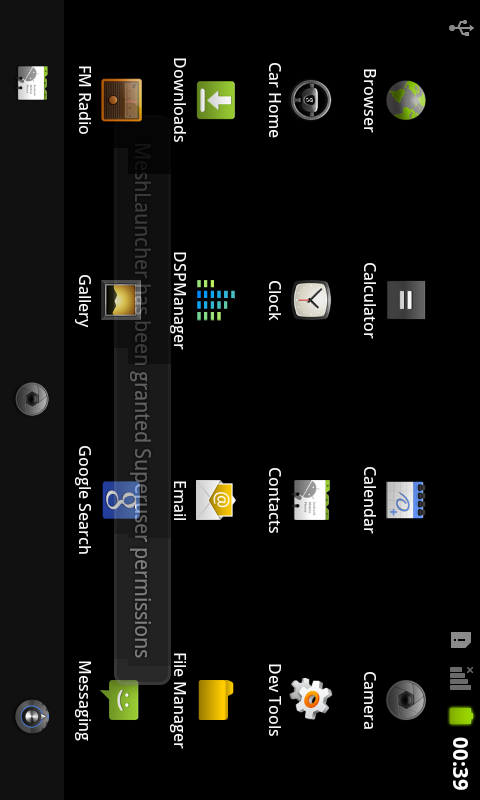
The toast is Superuser's, the app that guards su on this ROM: it announces every grant, and the announcement lands in the framebuffer before the read does.
Then I made the picture worse on my own. The capture looked sideways, so I rotated it. The next file was 2.6 KB of black. Then I read the buffer as 800 pixels wide, and the file after that was this:
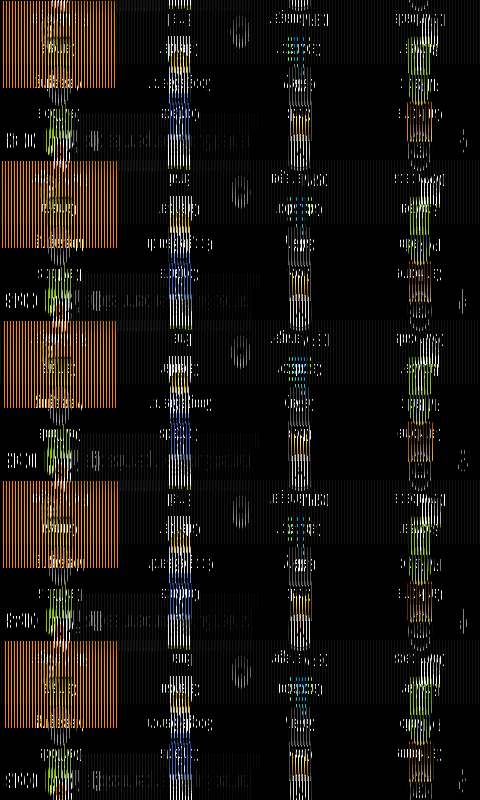
stride had said 1920 bytes the whole time, which is 480 pixels. The capture had been sideways because the keyboard was slid out and the screen had rotated with it. I reverted the change.
The framebuffer was not the liar#
Now line up the two paths. On the laptop, a later script of mine used the same mapping as the launcher, red, green and blue in bytes 0, 1 and 2, and the result was still garbage. On the phone, that mapping gave correct colours every time. Later, a dump written to a file on the phone with su -c 'cat /dev/graphics/fb0' and copied off with adb pull decoded as RGBX into a readable screen too. The difference between the bad pictures and the good ones is the road the bytes took to my laptop, through an adb shell pipe, not the pixel format. Which step on that road mangled them I never tested. I had spent the first half of the night suspecting the GPU's colour order on evidence produced by my own plumbing.
The Superuser toast in every capture#
I did not want a root announcement in my screenshots. Superuser keeps its per-app settings in SQLite, so I turned notifications off for the launcher:
adb shell "sqlite3 /data/data/com.noshufou.android.su/databases/permissions.sqlite \"UPDATE apps SET notifications=0 WHERE package='com.mesh.launcher';\""
Fn+S, and the toast, again. Superuser's preferences file:
<?xml version='1.0' encoding='utf-8' standalone='yes' ?>
<map>
<int name="last_notification_uid" value="10059" />
<boolean name="last_remember_value" value="true" />
<long name="last_notification_time" value="315967724812" />
</map>
No switch for toasts in there, only a record of the last one. The way out of the toast is not to call su at all, so I went looking for another way in.
A system app is not the system user#
The theory: an APK in /system/app/ is a system app, system apps get more, maybe more includes the graphics group. I pushed MeshLauncher there, rebooted and asked the kernel:
Uid:	10059	10059	10059	10059
Groups:	1015 3001 3002
Same user, no graphics. Moving into /system/app/ made it a system app in roughly the way sleeping in a bank lobby makes you a banker. So I added android.permission.READ_FRAME_BUFFER to the manifest, a permission whose name is the whole job description, and logcat answered on the next boot:
W/PackageManager( 1351): Not granting permission android.permission.READ_FRAME_BUFFER to package com.mesh.launcher (protectionLevel=2 flags=0x8be45)
Protection level 2 is signature: only apps signed with the same key as the platform get it. My APK was signed with a debug key, and the launcher kept falling back to su:
D/su ( 1731): 10059 com.mesh.launcher executing 0 cat /dev/graphics/fb0 using shell /system/bin/sh : sh
So, back to Superuser. I added allow rows with notifications and logging off to both of its databases, su.db and permissions.sqlite, and rewrote the preferences file with a notifications setting of my own. Fn+S: toast. Three stores of settings agreed that this app should not be announced, and the toast disagreed with all three. Where it actually makes that decision, I never found out. I stayed very calm about it, in the way a man stays calm while deciding not to type anything irreversible into a root shell.
What I typed instead was chmod 666 /dev/graphics/fb0, a stopgap that made the node readable by everyone. Before anyone pressed Fn+S on it, I had a better idea, and I set the node back to 660 on the way, on the grounds that the system user would surely not need the help.
test-keys: signing with the platform key#
The right question was whether the app could be signed with some other key, and the ROM had an answer ready:
ro.build.display.id=GWK74
ro.build.type=user
ro.build.tags=test-keys
test-keys means the ROM was built without its own signing keys and uses the ones in AOSP, the Android Open Source Project, which Google publishes in its source tree. The test-keys post covers what that opens up and how the signing works. The short version: download platform.pk8 and platform.x509.pem, convert them into a Java keystore, sign the APK with -sigalg SHA1withRSA -digestalg SHA1, and declare android:sharedUserId="android.uid.system" in the manifest. Java 6's keytool refused the conversion with keytool error: java.io.IOException: parseAlgParameters failed: DER input not an octet string; Java 8's did it.
Reinstall, reboot, ask the kernel again:
Uid:	1000	1000	1000	1000
Groups:	1015 3001 3002 3003
UID 1000 is system. My launcher was now, for every check that compares signatures, part of the operating system. Fn+S, and the phone said permission denied. The next try saved a file, and the file was a picture of Superuser asking whether it could grant root to the launcher. The system user had fallen back to su too:
E/su      ( 1748): sudb - Opening database
E/su      ( 1748): sudb - Database opened
E/su      ( 1748): sudb - Database closed
I/ActivityManager( 1351): Start proc com.noshufou.android.su for broadcast com.noshufou.android.su/.SuRequestReceiver: pid=1749 uid=10022 gids={3003, 1015}
D/su      ( 1748): 1000 com.mesh.launcher executing 0 cat /dev/graphics/fb0 using shell /system/bin/sh : sh
Why READ_FRAME_BUFFER opens nothing#
crw-rw----    1 root     graphics   29,   0 Jan  6 01:03 /dev/graphics/fb0
Groups:	1015 3001 3002 3003
The node wants group graphics, GID 1003. The process has 1015 (sdcard_rw), 3001 and 3002 (the two Bluetooth groups) and 3003, which is inet, the group allowed to open network sockets. None of them is 1003.
Android 2.3 turns permissions into groups in /system/etc/permissions/platform.xml. INTERNET gets <group gid="inet" />, WRITE_EXTERNAL_STORAGE gets <group gid="sdcard_rw" />, and so on. READ_FRAME_BUFFER appears in that file exactly once, as <assign-permission name="android.permission.READ_FRAME_BUFFER" uid="shell" />, a grant to the adb shell user. It has no <group> entry. Even when the package manager grants it, it adds the app to no group, and the framebuffer is a device node that checks groups. I never went back to logcat to see whether the platform-signed build got the permission at all; with no group behind it, the answer would not have opened the device either way.
chmod 664 and an init.d script#
The fix that worked is not elegant:
adb shell chmod 664 /dev/graphics/fb0
Read access for everyone, the help the system user would surely not need. The next Fn+S read the framebuffer directly as UID 1000: no su, no toast, no dialog, correct colours. A chmod on a device node does not survive a reboot, so it went into an init.d script, the folder CyanogenMod runs at boot:
adb shell mount -o remount,rw /system
adb shell "mkdir -p /system/etc/init.d"
adb shell "echo '#!/system/bin/sh' > /system/etc/init.d/99fb0"
adb shell "echo 'chmod 664 /dev/graphics/fb0' >> /system/etc/init.d/99fb0"
adb shell "chmod 755 /system/etc/init.d/99fb0"
The SD card had to go too: as UID 1000 the copy onto the card failed, so screenshots now land in /data/media/Screenshots/ on the phone's own 1 GB data partition. A BroadcastReceiver lets me trigger one from the laptop with adb shell am broadcast -a com.mesh.launcher.SCREENSHOT, which is how I took the rest of that night's screenshots:
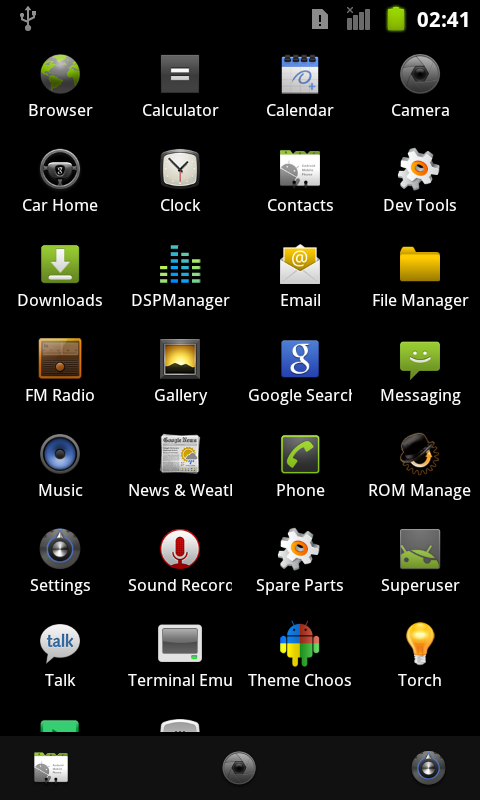
The platform key still earns its keep there. It is why the app runs as UID 1000 and stays out of the ordinary app sandbox. The chmod covers the one gap READ_FRAME_BUFFER was named for.
After the reflash, the receiver hangs#
That evening the phone got a full reflash of CyanogenMod, and a reflash rewrites /system, the init.d script included. The first screenshot broadcasts saved nothing, and logcat had this:
W/ActivityManager( 1341): Timeout of broadcast BroadcastRecord{406457b0 com.mesh.launcher.SCREENSHOT} - receiver=android.os.BinderProxy@40714540, started 10005ms ago
W/ActivityManager( 1341): Receiver during timeout: ResolveInfo{4067b4b8 com.mesh.launcher.ScreenshotReceiver p=0 o=0 m=0x108000}
I/ActivityManager( 1341): Skipping duplicate ANR: ProcessRecord{406ef6e0 1440:com.mesh.launcher/1000} Broadcast of Intent { act=com.mesh.launcher.SCREENSHOT cmp=com.mesh.launcher/.ScreenshotReceiver }
A receiver gets about ten seconds before Android declares it not responding, and mine used all of them. I ran the chmod by hand, broadcast again, and still got nothing, with the node now reading:
crw-rw-r-- 1 root graphics 29, 0 Jan 6 17:40 /dev/graphics/fb0
World-readable, still no screenshot, so I decided a direct read of fb0 simply hangs on a fresh install and switched the launcher to su only. Look at the last line again, though: logcat skips the ANR as a duplicate for process 1440, the launcher that had already timed out, and that process was never restarted between the first broadcast and my chmod. I fixed the permissions underneath a process that was already stuck and called the result evidence. What it was stuck on, I never pinned down. My best guess is a question asked to nobody: when the open failed, the code fell back to su, and su on this phone waits for a person to answer.
That guess got some support from the su-only build. Its first saved screenshot is the question itself:
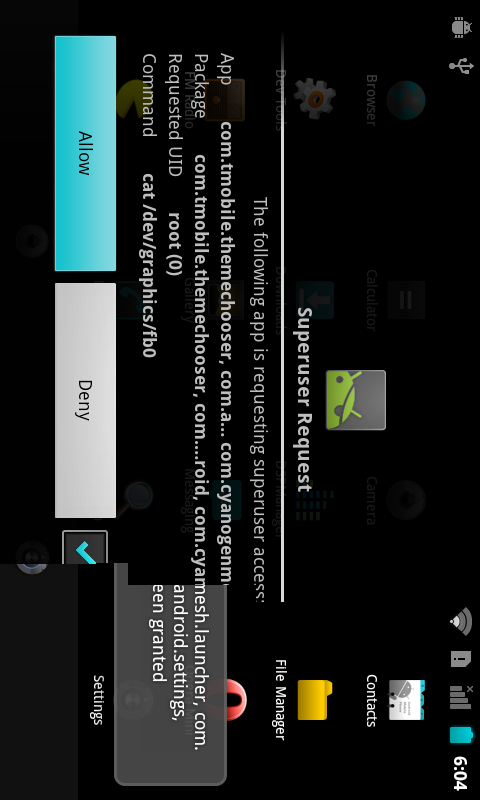
The phone took a screenshot of itself asking for permission to take a screenshot. The app name in the dialog is not mine because UID 1000 is shared by every system package, and Superuser shows them all, starting with the theme chooser.
I tapped Allow with Remember ticked. The next screenshot asked again. Superuser's su.db explained a little of it:
1|0|unknown|Unknown|0|cat /dev/graphics/fb0|-1||
3|10047|com.keramidas.TitaniumBackup|Titanium Backup|0|/system/bin/sh|1||
4|1000|com.mesh.launcher|MeshLauncher|0|/system/bin/sh|1||
5|1000|com.tmobile.themechooser, com.android.providers.settings, com.mesh.launcher, com.android.server.vpn, com.android.providers.subscribedfeeds, com.android.settings, com.android.systemui, android, com.cyanogenmod.cmparts|com.tmobile.themechooser, com.android.providers.settings, com.mesh.launcher, com.android.server.vpn, com.android.providers.subscribedfeeds, com.android.settings, com.android.systemui, android, com.cyanogenmod.cmparts|0|cat /dev/graphics/fb0|1||
Row 5 is my Allow, for UID 1000 and cat /dev/graphics/fb0, with all nine system packages folded into one name. Row 1 is a deny (-1) for the same command from UID 0, root itself, a request I never knowingly answered. Row 4 is the allow I had inserted by hand a few minutes earlier, for a different command. I deleted row 1. My notes from that evening move on to other things before the next screenshot, so I can't tell you whether that was the row that mattered.
What I would do first next time#
Look for the file a tool actually writes before declaring the tool dead. Read stride before guessing a width. And before blaming a pixel format, copy the bytes off the device with adb pull rather than through a shell pipe, because a picture of my own plumbing cost me half a night of suspecting the hardware.
The working setup is a platform-signed app running as the system user, a world-readable device node, an init.d script that a reflash deletes, and a permission called READ_FRAME_BUFFER still declared in the manifest, where it does exactly as much as it did on the first night. I'm keeping the screenshot of the phone asking permission to screenshot itself. Of everything I captured, it is the only picture that explains the whole night, and I didn't have to take it: the phone took it for me.
Filed under: android, security, hardware
Read next#
- Android test-keys: system UID with AOSP's public platform key: what the platform key unlocks beyond screenshots, and why the lock is still checked every time
- HTC Desire Z boot hang, an innocent cache wipe, and a reflash: the boot loop and factory reset in the middle of this chase, and the full reflash that came after
- HTC Desire Z journal app: 8 KB that would not fit in 900 MB: the journal app, where the screenshot binary I wrote off here turns out to work
- HTC Desire Z launcher keys: ADW's Back trick and two wrong fixes: the previous part, on the same home-screen app's keys
Sources#
- Gingerbread platform.xml (android-2.3.7_r1): permission-to-group mapping;
READ_FRAME_BUFFERappears once, as anassign-permissionforuid="shell", with no<group>entry - android_filesystem_config.h (android-2.3.7_r1): AID_GRAPHICS = 1003, AID_SDCARD_RW = 1015, AID_NET_BT_ADMIN = 3001, AID_NET_BT = 3002, AID_INET = 3003
- AOSP platform test-keys: the public
platform.pk8andplatform.x509.pemused by test-keys builds - HTC Desire Z (vision), CyanogenMod 7.2.0 (GWK74), Android 2.3.7: device logs,
/proc/<pid>/status, sysfs and Superuser databases as quoted above