A camera app for the HTC Desire Z, cut from 13,144 lines to 881
Contents
The plan was a fork. Take AnonCam, an open-source camera built on the Android 2.3 camera app, delete what my phone does not need, keep the rest. What shipped is 881 lines, and the part of AnonCam still in it fits in three files, renamed and cut down. I call that a fork the way I call a house with one original doorframe a renovation: technically, and only when nobody is checking the paperwork.
The phone is my HTC Desire Z, a 2010 Android slider with one 5-megapixel camera on the back and none on the front, running CyanogenMod 7, the community build of Android 2.3. The camera problem started as a memory problem: to free RAM I had switched off the stock gallery, and the stock camera leaned on that gallery to show the last shot. This part covers the camera I built instead, MeshCam, and two things I found while building it: a location the donor app collected and then never wrote into a photo, and a shutter button the phone had been carrying all along.
Freeing RAM took the camera's gallery with it#
A look at the process list put two apps near the top of the "not needed" pile: Gallery3D (com.cooliris.media) at 28 MB resident and QuickSearchBox at 20 MB, the second one with no Google services on the phone to search. Both went in two commands:
adb shell pm disable com.android.quicksearchbox
adb shell pm disable com.cooliris.media
That freed about 48 MB of resident memory, out of the phone's 512 MB. The stock browser went next, since Opera Mini does the browsing here. The stock camera kept taking photos, but its button for reviewing the last shot now pointed at an app that was switched off.
AnonCam: 13,144 lines for one camera#
The only Gingerbread-era camera source I found worth starting from was AnonCam, a fork of Lightbox's QuickSnap, which its README describes as based on the official Gingerbread camera app and made backwards compatible down to API 7. Apache 2.0, last commit in May 2012. Its source tree holds 77 Java files and 13,144 lines:
ui/: 33 files, an OpenGL head-up display for zoom, indicators and the settings overlaygallery/: 10 files of image lists and thumbnailsdevice/: 6 files, camera holders for the Evo, Captivate, Optimus 2X and other phones with quirks, plus the generic onesactivities/Camera.java: 2,514 lines on its own
And NoSearchActivity.java, 32 lines whose one method returns false from onSearchRequested() so the search key does nothing. I respect a class that knows exactly what it is for.
What survived the cut#
I took the camera lifecycle (CameraHolder, which opens, keeps and releases the one Camera object), the exposure and zoom helpers in ParameterUtils, and the exception class, renamed the package and cut them down. Everything else is new: one activity with the layout built in code, the same way as the journal app and MeshLauncher, my home-screen app for this phone.
| File | Lines |
|---|---|
| CameraActivity.java | 556 |
| CameraHolder.java | 141 |
| ImageSaver.java | 90 |
| ParameterUtils.java | 48 |
| GridOverlay.java | 38 |
| CameraHardwareException.java | 8 |
| Total | 881 |
The first build compiled clean on the first try and came out at 17 KB. The first launch showed buttons and no preview: the activity opened the camera in onResume() and raced the preview surface being created. With the camera opened after the surface exists, the preview showed on the glass and the volume key took the first photo, 2592×1952, a 1.9 MB JPEG in /sdcard/DCIM/Camera/.
The location AnonCam never wrote#
AnonCam asks for ACCESS_FINE_LOCATION, and its application class requests a location fix at most once an hour and keeps the result. Then the photo is saved:
mLastContentUri = ImageManager.addImage(
        mContentResolver,
        title,
        dateTaken,
        null, // location from gps/network
        ImageManager.CAMERA_IMAGE_BUCKET_NAME, filename,
        null, data,
        degree);
The comment names the argument, and the argument is null. A few dozen lines further down, before every capture, the code calls mParameters.removeGpsData() on the camera parameters. Whether that is a bug or the point I cannot say: the app is called AnonCam, and an anonymous camera that collects your location and then carefully throws it away is at least consistent with its name.
MeshCam wanted the opposite, behind a switch. GPS is off by default; with the toggle on, the location goes into the camera parameters and, after the JPEG is written, into the EXIF tags through ExifInterface, whose documentation wants each coordinate as three rationals, num1/denom1,num2/denom2,num3/denom3:
private static String toDMS(double coord) {
    coord = Math.abs(coord);
    int deg = (int) coord;
    double minF = (coord - deg) * 60;
    int min = (int) minF;
    double secF = (minF - min) * 60;
    int sec = (int) (secF * 10000);
    return deg + "/1," + min + "/1," + sec + "/10000";
}
The button I found last#
MeshCam's first shutter was the volume key, because the volume key was the one I knew about. Then I asked what the small key on the phone's side was for, and watched getevent while pressing it. The compass flooded event6 with readings; among them, from event3, the keypad:
/dev/input/event3: 0001 00d3 00000001
/dev/input/event3: 0001 00d3 00000000
Scan code 0xd3, 211, down and up. The keypad layout file had the rest:
$ adb shell cat /system/usr/keylayout/vision-keypad.kl 2>/dev/null | grep -i "211\|camera\|0xd3"
key 211   FOCUS
key 212   CAMERA
A two-stage camera button: half-press for focus, full press for the shutter. I keep a list of things on this phone that were there all along and that I found last. The screenshot binary from the journal post opened it. The camera button is entry two, and I would like to point out that I found both by finally asking the phone directly, which is apparently the method I save for after all the others.
Wiring it took a few lines in dispatchKeyEvent:
if (event.getAction() == KeyEvent.ACTION_DOWN && event.getRepeatCount() == 0) {
    if (code == KeyEvent.KEYCODE_CAMERA) {
        onShutter();
        return true;
    }
    if (code == KeyEvent.KEYCODE_FOCUS) {
        doAutoFocus();
        return true;
    }
    if (code == KeyEvent.KEYCODE_VOLUME_UP || code == KeyEvent.KEYCODE_VOLUME_DOWN) {
        onShutter();
        return true;
    }
}
A few presses on the real button later: focus on the half-press, a photo on the full one. Both did what the layout file promised, which on this phone I treat as a reason to press them again.
The black rectangle in every screenshot#
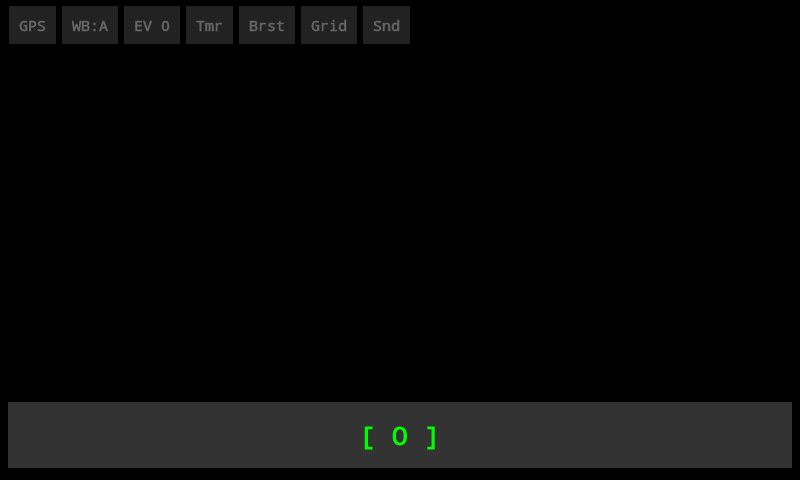
That is MeshCam as CMScreenshot, the ROM's screenshot app, sees it: every control, and black where the viewfinder is. On the phone itself the preview was there. The explanation I worked with at the time is that on Android 2.3 the camera preview goes to a hardware overlay that the screenshot path does not read. It fits what I saw, and I did not verify it further, so take it as the likely reason and the black rectangle as the fact.
The photo below came from the same build: a later shot, 2592×1952 and 1.9 MB on the phone. The copy here was re-saved with the EXIF data stripped down to the camera maker.
What MeshCam does#
Seven toggles along the top, left to right:
- GPS: location into the photo, off by default
- WB: white balance, cycling auto, daylight, cloudy, incandescent and fluorescent, skipping any the camera does not report
- EV: exposure compensation, stepping through the range the camera reports
- Tmr: self-timer, off, 3 s or 10 s, with a countdown on screen
- Brst: burst of five shots, 500 ms apart
- Grid: rule-of-thirds lines
- Snd: silent shutter, muting
STREAM_SYSTEMaround the capture
Below them, the shutter. There is no flip button: getNumberOfCameras() returns 1, and the button I had added for a front camera went the way of the front camera. There is no gallery either, which is how this started.
It installs the way my other apps do, as a system app: /system/app/MeshCamera.apk, mode 644, signed with the AOSP platform test key and SHA1withRSA. Then pm disable com.android.camera for the stock camera, and MeshLauncher's bottom bar got pointed at MeshCam instead. The final APK is 18,860 bytes.
What I have now is a camera that opens to a viewfinder and seven buttons, answers the key the phone was built around, and writes my location only when I ask it to. The donor collected the location and threw it away. I counted 13,144 lines of it before I asked what the key on the side of the phone was for, and that order of operations goes on the list as well, under my own name.
Filed under: android, java, htc-desire-z, cyanogenmod, camera, gingerbread
Read next#
- HTC Desire Z journal app: 8 KB that would not fit in 900 MB: the app built the same way the same week, and the first entry on the list
- Debloating Android 2.3 on the HTC Desire Z: use pm disable: why
pm disableis the tool here, and what it cost to learn that - A 22 KB home screen for the HTC Desire Z, built without Gradle: MeshLauncher, whose bottom bar now opens MeshCam
- Terraria on the HTC Desire Z: a DRM loop and a dead edge: the next part, a game this phone could almost play
Sources#
- AnonCam on GitHub: the donor, a fork of Lightbox's QuickSnap; file and line counts,
Camera.javaandNoSearchActivity.javaquoted from it - lightbox/QuickSnap on GitHub: the project AnonCam was forked from
- Android Camera API reference:
getNumberOfCameras(),Camera.Parameters - ExifInterface reference: the rational
num/denomformat for GPS latitude and longitude