Konsole had the switch all along
Contents
Plasma, KDE's desktop, can switch itself between light and dark, and every app on it is supposed to take the hint. On this Fedora 44 desktop, with Plasma 6.7 and its automatic switching turned on (AutomaticLookAndFeel=true), the desktop went light, the Qt apps followed, the GTK apps followed, and Kate, KDE's text editor, followed. Konsole 26.08.1, KDE's own terminal, stayed dark: a black rectangle on a white desktop, ignoring a memo from its own family. I took that personally, which is a thing I do with software more often than I'd like to admit.
I didn't find a checkbox for it. I'd love to say I searched the settings dialog with care; what I did was decide that reading a shared library sounded more fun than reading a settings dialog, and go looking in the binary instead. Keep that decision in mind. It comes back.
Konsole's config keys are compiled in as UTF-16#
KDE code writes its config keys as QStringLiteral, which Qt builds into the binary at compile time as UTF-16: two bytes per character, and for plain ASCII names every other byte is zero. Plain strings looks for runs of single-byte characters and walks straight past them. strings -e l looks for 16-bit little-endian ones. Konsole's generated settings code lives in libkonsoleprivate; here is the search, re-run for this post with the same pattern both ways:
$ cd /usr/lib64
$ strings libkonsoleprivate.so.26.08.1 | grep -E "LightDark|ThemeProfile|SystemTheme"
_ZN7Konsole14ProfileManager20setLightThemeProfileERK28QExplicitlySharedDataPointerINS_7ProfileEE
_ZN7Konsole14ProfileManager19setDarkThemeProfileERK28QExplicitlySharedDataPointerINS_7ProfileEE
_ZN7Konsole14ProfileManager21loadLightDarkProfilesEv
$ strings -e l libkonsoleprivate.so.26.08.1 | grep -E "LightDark|ThemeProfile|SystemTheme"
LightThemeProfile
DarkThemeProfile
SyncProfileWithSystemTheme
LightDarkTheme
Plain strings finds C++ function names with the words in them, mangled, and not one config key. -e l finds four: a group and three keys. I enjoyed that far more than a grown adult should enjoy grep. They led to src/settings/konsole.kcfg at the v26.08.1 tag, the XML file where a KDE app declares its settings:
<group name="LightDarkTheme">
  <entry name="SyncProfileWithSystemTheme" type="Bool">
    <label>Sync profile with system theme</label>
    <default>false</default>
  </entry>
  <entry name="LightThemeProfile" type="String">
    <label>Profile to use for light system theme</label>
    <default>_builtin_</default>
  </entry>
  <entry name="DarkThemeProfile" type="String">
    <label>Profile to use for dark system theme</label>
    <default>_builtin_</default>
  </entry>
</group>
Off by default, and both profiles default to Konsole's built-in one. So the feature I wanted had been installed the whole time, switched off, waiting, as far as I could tell, for someone to set it by hand in a config file. I was delighted to be that someone. In hindsight, the delight was the first warning that I had stopped looking for an easier way in.
In the source, MainWindow.cpp does the rest. With the switch on, each window connects Qt's QStyleHints::colorSchemeChanged signal to applyThemeProfile(), which sets the light or the dark profile on every session, and it applies the current scheme once when the window is created. Anything that isn't Qt::ColorScheme::Dark counts as light. New tabs get the matching profile too, because ProfileManager::defaultProfile() asks the same question.
Three konsolerc keys, set by hand#
kwriteconfig6 --file konsolerc --group LightDarkTheme --key SyncProfileWithSystemTheme true
kwriteconfig6 --file konsolerc --group LightDarkTheme --key LightThemeProfile user-light
kwriteconfig6 --file konsolerc --group LightDarkTheme --key DarkThemeProfile user-default
The two values are profile names: the Name= line inside each .profile file under ~/.local/share/konsole/. Konsole matches them by name, and a typo falls back to the built-in profile without a word.
user-default is my dark profile. user-light was to be its twin: the same font, a different ColorScheme= line. The light color scheme came from the light variant of the Zed theme I already use, converted from its terminal.ansi.* colors by a small script; running the script again reproduces the installed file byte for byte.
Testing with konsole --separate#
My working shell lived inside Konsole, so restarting it was out. konsole --separate starts an independent Konsole process with its own window, which reads the configuration fresh. xdotool search --pid finds that window, and ImageMagick's import -window takes a screenshot of it. In light mode: light background, readable ANSI colors. The checkmark went green.
I distrust green checkmarks on principle. This one I had made myself, which should have made me more suspicious, not less.
The green checkmark missed two things#
The checkbox on the General page#
Writing this up, I ran the same plain search on the other library, libkonsoleapp:
$ cd /usr/lib64
[…]
$ strings libkonsoleapp.so.26.08.1 | grep -E "LightDark|ThemeProfile|SystemTheme"
_ZN7Konsole10MainWindow17applyThemeProfileEv
_ZN7Konsole14ProfileManager20setLightThemeProfileERK28QExplicitlySharedDataPointerINS_7ProfileEE
_ZN7Konsole14ProfileManager19setDarkThemeProfileERK28QExplicitlySharedDataPointerINS_7ProfileEE
kcfg_SyncProfileWithSystemTheme
applyThemeProfile
Among the mangled names sits kcfg_SyncProfileWithSystemTheme, in plain ASCII. Konsole's settings dialog runs a KConfigDialogManager, which binds any widget whose object name is kcfg_ plus a config key to that key and loads and saves it by itself. In the 26.08.1 source, that widget is a checkbox on the General page:
<widget class="QCheckBox" name="kcfg_SyncProfileWithSystemTheme">
 <property name="text">
  <string>Automatically switch profile based on system theme</string>
 </property>
</widget>
Once that setting is applied, the Profiles page swaps its "Set as Default" button for "Set as Light" and "Set as Dark", which write the two profile keys for you. The setting I dug out of a binary in UTF-16 has a checkbox with a full sentence on it. I am choosing to find this funny.
In my defence, it is new. The commit that added it was merged in April 2026, and the first stable release with it is Konsole 26.08.0, tagged in August.
I have been inside a KDE binary looking for a config key before. That time, in Haruna, I found a string that wasn't the key. This time I found the right keys and missed the checkbox. Progress, of a kind: I am now wrong one layer closer to the screen.
The dark profile was light#
Then I compared the two profiles:
$ cd ~/.local/share/konsole
$ diff user-default.profile user-light.profile
7c7
< Name=user-default
---
> Name=user-light
$ grep ColorScheme user-default.profile user-light.profile
user-default.profile:ColorScheme=islands-light
user-light.profile:ColorScheme=islands-light
One difference, the name. Both profiles pointed at the light color scheme. The dark profile's file had last been written while I was testing, and the copy in my dotfiles repository, committed earlier the same day, still said ColorScheme=islands-dark.
Every test I had run was in light mode, so none of them had ever asked Konsole for the dark profile. And with the files as they stood, a new window in light mode came up light whichever profile it got. user-default is also Konsole's default profile, so the window would have come up light with the switch turned off. That light-mode test couldn't tell a working switch from a missing one. I had built a test that would pass with the feature deleted, run it, and been pleased with myself. There is a word for a test like that, and the printable one is "decorative".
The fix was the line my dotfiles still had, ColorScheme=islands-dark, back in the dark profile, which made the file byte for byte the copy I had saved before changing anything. Then came the half of the test I had skipped, and the part I had only read in the source.
Dark, light, dark in one open window#
In dark mode, a new konsole --separate window came up dark: background pixel 24, 25, 27. Then the part that matters: one konsole --separate window, started without --profile so the switch picks its profile, left open while Plasma's color scheme changed under it. plasma-apply-colorscheme BreezeLight, four seconds, a screenshot. plasma-apply-colorscheme BreezeDark, four seconds, another screenshot.
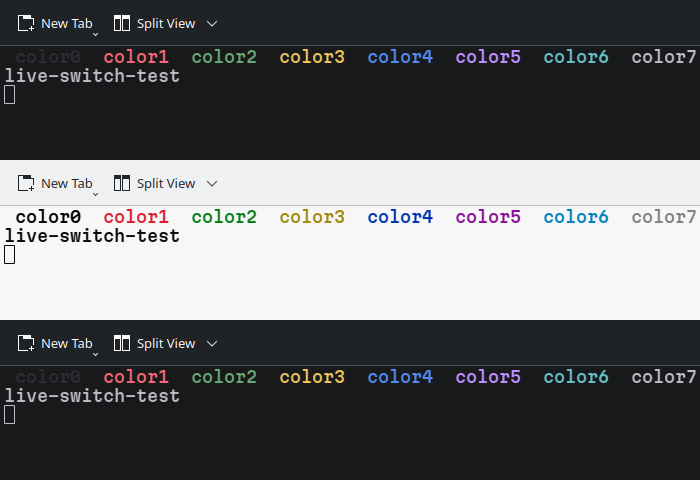
The background pixel went from 24, 25, 27 to 247, 247, 247 and back, and the ANSI palette moved with it. Dark, light, dark, in a window that stayed open the whole time. I watched a terminal change its mind twice and felt nothing but relief, which tells you how the afternoon went.
Two caveats. plasma-apply-colorscheme is not the scheduled switch: Plasma switching on its own schedule, which is how this started, is a different trigger, and I haven't watched that one drive Konsole yet. And the round trip leaves a trace: it adds an explicit ColorScheme=BreezeDark line under [General] in ~/.config/kdeglobals, so I copied that file before the test and put the copy back afterwards.
Mode 2031: what Konsole can't pass on#
Konsole can repaint itself; the window above did it twice. It can't tell the programs running inside it. The terminal now knows the desktop went light, and it keeps that to itself.
There is a way to do that: DEC private mode 2031, from the Contour terminal's spec. A program enables it with CSI ? 2031 h, and from then on the terminal sends CSI ? 997 ; 1 n (dark) or CSI ? 997 ; 2 n (light) whenever the preference changes; CSI ? 996 n asks for the current one. Konsole 26.08.1's Vt102Emulation.cpp handles none of them. It does answer OSC 11, "what is your background color?", whenever a program asks. With nothing to tell a program when to ask again, the program asks once, at startup.
So the programs that pick light or dark by themselves decide when they start:
- nvim 0.11 queries the background with OSC 11 at startup, and it also enables mode 2031 on terminals that support it. On Konsole it gets the first part only, so an nvim that was open before the switch keeps its old background until it restarts.
- Helix 25.07.1, the latest release, has no light/dark theme switching. Master has it, through
[theme] darkandlightkeys, and it detects the mode with 2031. On Konsole, master would use itsfallbacktheme, which defaults to the dark one. - delta and bat start fresh on every run, so they follow for free. delta 0.19.1 asks the terminal for its background by default (
--detect-dark-light=auto), and bat 0.26.1 defaults to--theme=auto.
delta didn't follow at first, and that was my doing. By this point I had stopped being surprised that the last obstacle was me. My ~/.gitconfig pinned it dark: syntax-theme = "Visual Studio Dark+", dark = true, and hand-picked dark red and dark teal diff backgrounds. With those lines commented out, delta detected the background itself, and diffs in a light Konsole came out with light backgrounds.
Konsole had the switch all along, or at least since August: a checkbox on the General page, unticked by default. What it can't do is pass the news on to nvim. What I didn't have, until the end, was a dark-mode test. Somewhere on this desktop there will always be one window that didn't get the memo: whichever nvim I left open across the switch. At least I know which one now, and why.
Filed under: linux, kde, theming, tui
Read next#
- Two libavcodecs behind one soname — an earlier time I grepped a KDE binary for a config key, and found an mpv property name instead.
Sources#
- Konsole v26.08.1
src/settings/konsole.kcfg— theLightDarkThemegroup, keys and defaults - Konsole v26.08.1
src/MainWindow.cpp—colorSchemeChanged→applyThemeProfile(), applied at window creation and on every settings change - Konsole v26.08.1
src/profile/ProfileManager.cpp— profiles matched by name, built-in fallback,defaultProfile()following the scheme - Konsole v26.08.1
src/settings/GeneralSettings.ui— the checkbox;ProfileSettings.uiandProfileSettings.cpp— the Set as Light / Set as Dark buttons - Konsole v26.08.1
src/settings/ConfigurationDialog.cpp— the dialog'sKConfigDialogManager;kconfigdialogmanager.h— widgets namedkcfg_<Key>are bound to<Key> - Konsole commit e4e20bb6 and MR !1206 — "Add automatic profile switching based on system theme", merged 2026-04-28
- Konsole v26.08.1
src/Vt102Emulation.cpp— no handling for mode 2031 or the 996/997 reports;src/session/SessionController.cpp— answers OSC 10/11 color queries - Contour: Dark and Light Mode detection — the mode 2031 spec
- Neovim commit d460928 — "update 'background' on theme change events", first released in 0.11.0;
_defaults.luaat v0.11.6 — the OSC 11 query at startup - Helix PR #14356 — mode 2031 light/dark detection, merged after 25.07.1; master
themes.md—[theme] dark/light/fallback - delta 0.19.1
--help—--detect-dark-light, defaultauto - bat v0.26.1 CHANGELOG — automatic theme by terminal colors, since v0.25.0
- GNU binutils: strings —
-e l, 16-bit little-endian - Qt 6: QString — UTF-16 code units;
QStringLiteraldata generated at compile time - Qt 6: QStyleHints —
colorSchemeandcolorSchemeChanged