HTC Desire Z journal app: 8 KB that would not fit in 900 MB
Contents
The package manager looked at an APK of 8,482 bytes, looked at a /data partition that df had just reported with 928,136 KB available, and answered INSTALL_FAILED_INSUFFICIENT_STORAGE. I have been lied to by this phone before, Android, but rarely with the evidence printed on the same screen a few commands earlier.
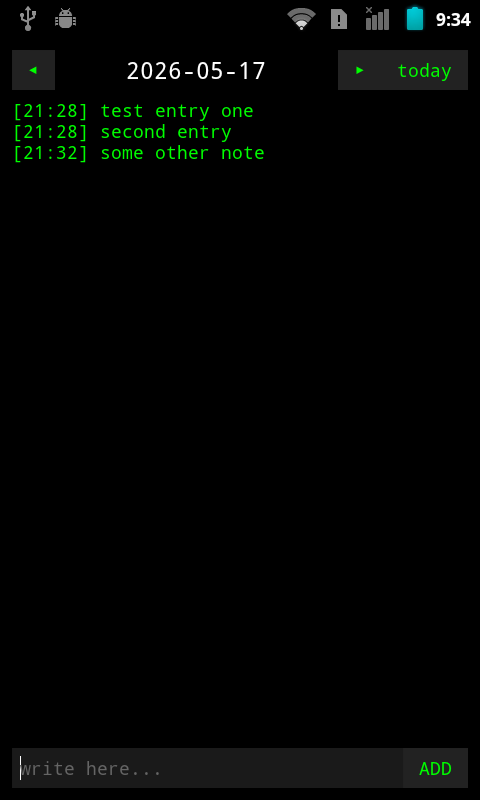
The phone is my HTC Desire Z, a 2010 slider with a hardware keyboard, running CyanogenMod 7 (the community build of Android 2.3); these days most of what runs on it is code I compiled myself with a Java 6 toolchain, because almost nothing current installs. This part is about one more such app: a journal that keeps one plain text file per day. Writing it took an evening. Getting the phone to accept it, test it and photograph it took the rest of that evening, and the photograph came with a correction to my own notes.
Why the journal had to be written#
I looked for an existing one first. The archive.org APK collection had Easy Diary 1.4.121, whose manifest asks for sdkVersion:'16': Android 4.1 or newer. It also had two Samsung apps from 2009, Mini Diary and Memo, which target an API level this phone can run. Both failed the same way:
Failure [INSTALL_FAILED_MISSING_SHARED_LIBRARY]
Failure [INSTALL_FAILED_MISSING_SHARED_LIBRARY]
They declare Samsung framework libraries that a CyanogenMod ROM does not ship. Compatible on paper, in the wrong family. So I built one.
One activity, one text file per day#
The spec I wrote down was short: dated text files on the SD card, no database, dark theme to match MeshLauncher (the home-screen app I wrote for this phone), and a layout that a later SFTP sync could copy without an export step. The result was a 193-line activity plus, a little later, a 32-line broadcast receiver, all layout built in code, green monospace on black. The storage layer is three constants and an append:
private static final String DIR = Environment.getExternalStorageDirectory() + "/journal";
private static final SimpleDateFormat DATE_FMT = new SimpleDateFormat("yyyy-MM-dd");
private static final SimpleDateFormat TIME_FMT = new SimpleDateFormat("HH:mm");
Each day is /sdcard/journal/YYYY-MM-DD.txt, each entry a line [HH:MM] text, written with FileWriter(file, true). grep searches it, adb pull backs it up, and a broken phone leaves behind files any computer can read.
The build is the same pipeline as MeshLauncher: javac from Zulu Java 6, dx on a Java 8 runtime, aapt, and jarsigner with SHA1withRSA and the AOSP platform test key. With the receiver in, the APK came to 8,910 bytes.
The installer that ran out of room on an empty disk#
adb install -r failed with INSTALL_FAILED_INVALID_INSTALL_LOCATION. I reset the global install location to auto: same error. I added android:installLocation to the manifest as auto, then internalOnly, then preferExternal, and rebuilt each time: same error. adb install -f, which forces internal storage: same error. Then I went around adb install and called the package manager directly, once plain and once with -s for the SD card:
$ adb shell pm install /data/local/tmp/journal-debug.apk 2>&1 ; adb shell "pm setInstallLocation 2 && pm install -s /data/local/tmp/journal-debug.apk" 2>&1
	pkg: /data/local/tmp/journal-debug.apk
Failure [INSTALL_FAILED_INSUFFICIENT_STORAGE]
	pkg: /data/local/tmp/journal-debug.apk
Failure [INSTALL_FAILED_CONTAINER_ERROR]
Insufficient storage on the internal partition, with 928,136 KB free on it. A container error on the SD card, which had about 58 GB free and already held four apps in their encrypted ASEC containers, Terraria and SMSSecure among them. Three different errors for one 8 KB file, and each of them blamed a different place. I never found out what state the package manager had got itself into.
The phone is S-OFF, so /system can be remounted writable, and the package manager treats anything in /system/app/ as a system app:
adb shell "mount -o remount,rw /system"
adb push bin/journal-debug.apk /system/app/Journal.apk
adb shell "chmod 644 /system/app/Journal.apk"
pm list packages showed dev.tsvinc.mesh.journal a few seconds later, without a reboot, and the app launched in 338 ms. No install dialog, no verification, no complaint about storage. The front door was locked; the window next to it was open and had a doormat.
No input tap, so entries arrive by broadcast#
Testing from the laptop needs a way to press ADD. CyanogenMod 7's input command has two verbs:
$ adb shell input tap 400 750 2>&1 || echo "no tap support"
Error: Unknown command: tap
usage: input [text|keyevent]
       input text <string>
       input keyevent <event_code>
input text typed into the entry field fine. After DPAD-right plus Enter, and again after Tab plus Enter, I looked for the day's file and found nothing; the file I looked for, as the next section shows, was tomorrow's, so those two attempts never got a fair hearing. So the app got a second way in, a BroadcastReceiver that writes the same line the button would:
public void onReceive(Context context, Intent intent) {
    String text = intent.getStringExtra("text");
    if (text == null || text.trim().length() == 0) return;
    new File(DIR).mkdirs();
    String time = new SimpleDateFormat("HH:mm").format(new Date());
    String dateStr = new SimpleDateFormat("yyyy-MM-dd").format(new Date());
    String entry = "[" + time + "] " + text.trim() + "\n";
    File f = new File(DIR, dateStr + ".txt");
    try {
        FileWriter fw = new FileWriter(f, true);
        fw.write(entry);
        fw.close();
    } catch (IOException e) {
        // silent — broadcast receiver can't show UI
    }
}
adb shell am broadcast -a dev.tsvinc.mesh.journal.ADD_ENTRY --es text 'entry text'
A shell script, test.sh, wraps seven checks around that: the app launches, it creates the directory, a broadcast writes an entry, the entry has the timestamp format, a second entry appends, an empty one is ignored, and logcat shows no crash.
The test that looked for tomorrow's file#
The first run passed three tests (launch, directory, no crash) and failed the four that read the journal file, two of them with cannot open and no such file on the file for the next day. My first theory was that a receiver added to an APK in /system/app/ needs a reboot to register. I rebooted. The same tests failed the same way; whatever the reboot fixed, it was not this.
The answer was in the file listing. The phone had written its entries into the 17th's file: its clock ran on GMT, the laptop's three hours ahead, and the laptop had already passed midnight. The test built the file name from the laptop's date:
DATE=$(date +%Y-%m-%d)
The fix asks the phone instead:
DATE=$(adb shell date +%Y-%m-%d | tr -d '\r')
The tr strips the carriage return that adb shell appends to every line of output, without which the file name ends in an invisible \r and the test keeps failing for a new reason. Seven of seven passed after that.
The screenshot binary I had declared dead#
Then I wanted a picture of the app for this post. Earlier that day a round of pm disable had switched off CMScreenshot, CyanogenMod's screenshot app, in a loop of eighteen packages, and a line in my project notes explained why that was fine: CMScreenshot was a wrapper around /system/bin/screenshot, a stub that exits 0 and writes nothing. Both were still on the phone:
$ adb shell "ls -la /system/app/CMScreenshot.apk 2>&1 && ls -la /system/bin/screenshot 2>&1"
-rw-r--r--    1 root     root          9621 Aug  1  2008 /system/app/CMScreenshot.apk
-rwxr-sr-x    1 system   graphics      5584 Aug  1  2008 /system/bin/screenshot
Setgid graphics, 5,584 bytes. I ran it with a path for the PNG I wanted, it returned without a word, the path stayed empty, and I wrote it off for the second time. A power-menu screenshot attempt half a minute later, and a search for any new image on the card, turned up /mnt/sdcard/tmpshot.bmp: 1,536,054 bytes, a 480×800 picture of the journal. So I tested the binary again, properly this time:
$ adb shell "rm /sdcard/tmpshot.bmp" && adb shell "/system/bin/screenshot" && adb shell "ls -la /sdcard/tmpshot.bmp 2>&1"
---xrwxr-x    1 system   sdcard_r   1536054 May 17 21:36 /sdcard/tmpshot.bmp
It works from a plain adb shell, with no su. It ignores its argument and always writes /sdcard/tmpshot.bmp. You could have mentioned the filename, screenshot. Silence and an empty path were the whole of your documentation, and I read them the wrong way twice.
That also casts doubt on the power menu. Twenty minutes later, with CMScreenshot still disabled, another power-menu screenshot wrote no new BMP at all. The likeliest author of the first tmpshot.bmp is the binary itself, run by me thirty seconds before I declared it dead.
What followed was a detour I would rather not have built. I wrote a small ScreenshotArchiver receiver for the android.intent.action.SCREENSHOT broadcast that the power menu sends, meant to turn tmpshot.bmp into dated PNGs. It kept archiving the same stale BMP, because the app that should have answered that broadcast was the one I had disabled. Running the binary from inside the receiver crashed it in libsurfaceflinger_client.so, at ScreenshotClient::getPixels(), so from my app's process it does not get as far as from adb shell; what the shell has that the app lacks, I did not chase. Then I did the obvious thing last, and pm enable answered:
Package com.cyanogenmod.screenshot new state: enabled
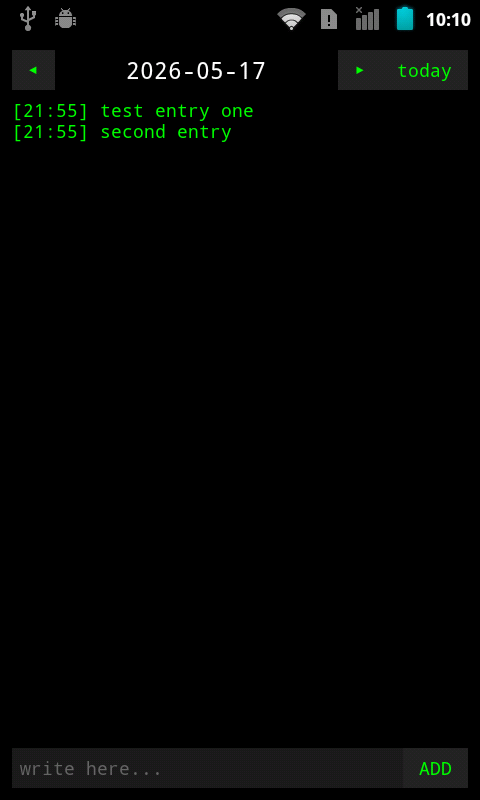
The screenshots after that landed in /sdcard/DCIM/Screenshots/ as screenshot-<milliseconds>.png, the first two at 15,774 and 16,507 bytes, and /sdcard/tmpshot.bmp did not come back. CMScreenshot writes PNGs of its own, by a path I never traced. My archiver had been duplicating a feature I had switched off, so it went, and the APK dropped from 10,756 to 9,862 bytes. The journal's Fn+S shortcut now sends the same broadcast the power menu does.
What it is now#
A journal I can type into on the keyboard, add to over adb, search with grep and back up with adb pull, installed through the window because the door said the house was full. The SFTP sync the flat files were chosen for is still a plan. The binary I wrote off twice is now the first thing I reach for when I need a picture of this phone, and the line in my notes that called it a dead stub now says where its file goes. I corrected that line myself, which is the only kind of documentation on this phone I have learned to trust, and only just.
Filed under: android, java, htc-desire-z, cyanogenmod
Read next#
- HTC Desire Z screenshots on Android 2.3, the long way round: the night I first wrote the screenshot binary off, and what I built instead
- Debloating Android 2.3 on the HTC Desire Z: use pm disable: the debloat work behind the
pm disablehabit that took CMScreenshot out - A 22 KB home screen for the HTC Desire Z, built without Gradle: MeshLauncher, the app whose build pipeline and test-key signing the journal copies
- A camera app for the HTC Desire Z, cut from 13,144 lines to 881: the next app built the same way, a camera cut down from an AOSP fork
Sources#
- archive.org APK Archive: the collection searched for a journal app that runs on Android 2.3
- Easy Diary 1.4.121 on archive.org: the APK whose manifest asks for API 16
- Mini Diary 1.0 on archive.org: one of the two Samsung apps that failed with a missing shared library