HTC Desire Z battery tile: the SD card its launcher can't write
Contents
The first builds of the logger turned the tile green and wrote nothing. The fifth place I tried to put its file worked. About thirteen hours after the first of those builds, I moved the file to the SD card on principle, and well after midnight I found it had written nothing again. The tile itself, the part with actual logic in it, took one build.
The tile lives on MeshLauncher, the home screen I wrote for my HTC Desire Z, a 2010 phone on CyanogenMod 7 (Android 2.3, a community build) where I had started replacing stock apps with small ones of my own. MeshLauncher runs as UID 1000, the system user, because this build trusts the platform key it is signed with. Hold on to that UID; it is the villain. The tile shows the phone's current draw from a kernel file, smem_text, which the previous post takes apart. Tap it and it logs one CSV line every ten seconds. This post is the day it took to find a directory that would accept those lines.
The Power tile#
The launcher's rightmost screen is a grid of ten tiles, two columns by five rows, red for off and green for on. Power is the eighth:
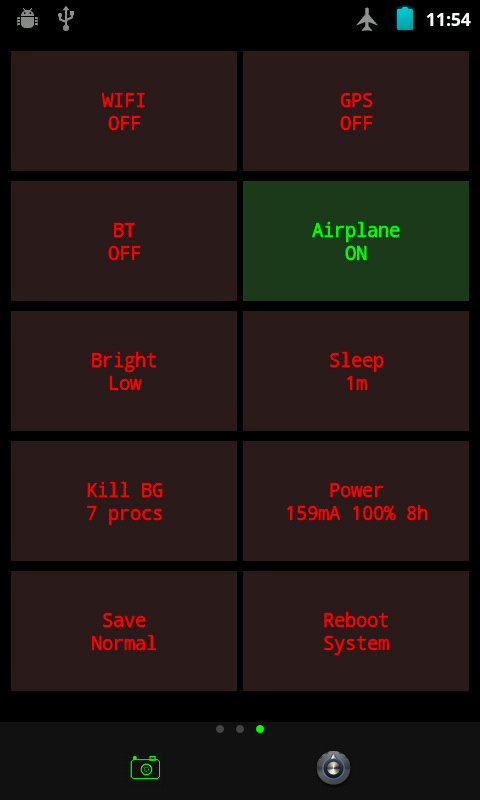
Every refresh, the tile reads three fields out of smem_text and does one division:
String smem = readFile("/sys/class/power_supply/battery/smem_text");
int dis = parseSmem(smem, "batt_discharge_current");
int cap = parseSmem(smem, "dis_percent");
int fullBat = parseSmem(smem, "full_bat");
String est = "";
if (dis > 0 && fullBat > 0) {
    int mAh = fullBat / 1000;
    float hoursLeft = (mAh * cap / 100.0f) / dis;
    int h = (int) hoursLeft;
    est = " " + h + "h";
}
Capacity in mAh, times the remaining fraction, over the current draw. In the screenshot that is 1,300 × 100% / 159 mA, 8.2 hours, shown as 8h. It assumes the phone keeps drawing exactly what it draws at the moment the screen refreshes, which no phone has ever done, and it is still more than the battery icon offers. readFile and parseSmem are a BufferedReader with a finally and a loop of startsWith plus Integer.parseInt; Android 2.3 is Java 6 territory, so nothing fancier.
The first version had a label that wrapped to a third line and pushed the tile out of line with its neighbours. A few rounds of layout fixes later it shows mA, percent and whole hours, and the grid went from nine tiles to ten so the last row was not a lonely Reboot.
The logger, and the review that caught its off switch#
What I had asked for was a toggle that logs battery drain, not a display. The second build did that: tap, the tile goes green, a Handler posts a runnable every ten seconds, each run appends a line of time,mA,mV,%,src,MHz (the est_h column came two builds later). A code review of that build found the first bug before any test did: onDetachedFromWindow() called removeCallbacksAndMessages(null) on the handler, so swiping to another screen of the launcher silently stopped the logging while the tile stayed ready to claim otherwise. That got fixed. A later round moved the logging state into static fields, on the theory that a rotation would rebuild the view and lose it. I have no record of ever running the rotation test that theory asked for. The static fields do die with the process, so restarting the launcher stops the logger, which I learned the plain way.
Five places to put one CSV#
Now the timeline the opening promised.
1. /sdcard/power-log.csv with a FileWriter. The tile went green. No file appeared anywhere on the card. To see the permissions I created the file as root, and the listing came back like this:
---xrwxr-x 1 system sdcard_r 0 May 18 10:23 /sdcard/power-log.csv
Owner system, and the owner has no read and no write. I filed that under strange and moved on, which was a mistake I would spend the rest of the day paying for.
2. /data/local/tmp/. The directory belongs to shell:shell with drwxrwx--x, and UID 1000 is neither. Nothing.
3. /data/data/com.mesh.launcher/power-log.csv, a hardcoded path in the launcher's own data directory. The check a few seconds after the push found nothing, so I rewrote the logger to use Context.openFileOutput(), pushed that, and on the next check found a file full of rows and declared openFileOutput the fix. The rows begin about half a minute after the hardcoded-path build went in and end seconds before the openFileOutput build replaced it. The new code writes to a files/ subdirectory, which did not exist. I had congratulated the wrong build. The right one had simply not been tapped yet when I looked.
4. Back to the SD card, through su. The manifest already declared WRITE_EXTERNAL_STORAGE, and the running launcher was in the right group:
Groups: 1015 3001 3002 3003
Group 1015 is the SD card's write group. A direct write still produced nothing, so the logger began shelling out to su -c "echo … >> /sdcard/power-log.csv". The first call sat behind a Superuser prompt; once I allowed it, two rows landed. Then I opened Superuser's database. It stores one grant per exact command string, and every log line is a different command, with its own timestamp in it. I had typed a blanket root grant for UID 1000 into that database, calmly. It survived exactly one log line, and I stayed calm about that too. A logger that asks permission every ten seconds is not a logger, and a blanket root grant to make it quiet is the kind of fix I would rather not leave on a phone, so su came out.
5. openFileOutput() into the app's own files/. It wrote nothing until I created files/ and shared_prefs/ by hand: the data directory of this system-app install held only lib/. After that and a reboot, it worked:
time,mA,mV,%,src,MHz,est_h
11:19:35,191,4135,100,1,806,6.8
11:19:45,135,4204,100,1,806,9.6
11:19:55,135,4204,100,1,245,9.6
The debug lines I had added to find out why it wasn't working never appeared in logcat, even after it was. I still don't know why, and at that point I chose not to ask.
The card is owned by the one app that cannot write to it#
Late that night I set a rule for every app on this phone: user data goes on the SD card, so that in an emergency I can pull the card and walk away. A couple of minutes before that I had finally read the card's mount options, and read them as good news:
/dev/block/vold/179:65 on /mnt/sdcard type vfat (rw,dirsync,nosuid,nodev,noexec,relatime,uid=1000,gid=1015,fmask=0602,dmask=0602,allow_utime=0020,codepage=cp437,iocharset=iso8859-1,shortname=mixed,utf8,errors=remount-ro)
The card is mounted with uid=1000, the launcher's own UID. I took that to mean the launcher owned the card and could write anywhere on it, and moved the power log to /sdcard/logs/ with Environment.getExternalStorageDirectory(), as the rule said. About half an hour later my GPS tracker app, which also ran as UID 1000, failed to write to the card, and the same line read the other way round.
FAT has no owners, so the kernel stamps every file with uid=1000,gid=1015 and masks the permissions: fmask=0602 takes read and write away from the owner and leaves the group everything. On Linux the owner's bits are checked first; a process whose UID owns the file never gets to the group bits, whatever groups it is in. Every file on that card is owned by UID 1000. MeshLauncher is UID 1000. The journal and camera apps run under ordinary app UIDs, fall through to the group bits, and write to the card happily. The tracker gave up its system UID that night and joined them. The launcher needs that UID for the settings its tiles change, so it can't. The launcher owns everything on the card and may touch none of it.
About eighty minutes after the move I checked whether the power log was writing. There was no file. The old copy in app-private storage was still there, untouched since the afternoon. The log went back to openFileOutput(), two minutes later it was writing again, 216 lines in, and that is where it lives: /data/data/com.mesh.launcher/files/power-log.csv, pulled with su -c cat.
A minute of it, on a cable, with airplane mode on and the radios off. The first row is on battery; the cable went back in before the second:
time,mA,mV,%,src,MHz,est_h
11:55:29,116,4206,100,0,806,11.2
11:55:39,116,4206,100,1,368,11.2
11:55:49,120,4205,100,1,806,10.8
11:55:59,120,4205,100,1,245,10.8
11:56:09,120,4205,100,1,245,10.8
11:56:19,112,4206,100,1,806,11.6
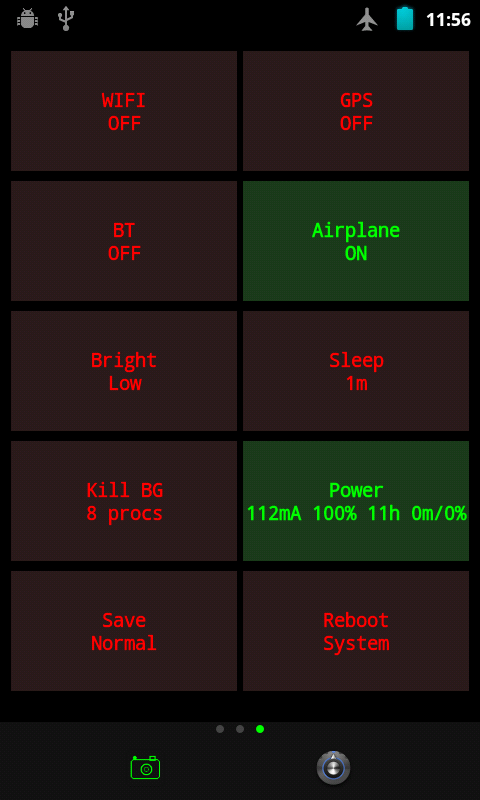
0m/0% is minutes since the tap and percent dropped since then. The tile was the easy part. I have the screenshot to prove it was green, and half a day of evidence that green meant nothing about the file.
Filed under: android, java, htc-desire-z, cyanogenmod, power-management, gingerbread
Read next#
- HTC Desire Z battery drain in milliamps, straight from sysfs -- the
smem_textfile the tile reads, and what its fields really mean. - Android test-keys: system UID with AOSP's public platform key -- why MeshLauncher gets to be UID 1000 at all.
- A 22 KB home screen for the HTC Desire Z, built without Gradle -- the launcher this tile lives in.
Sources#
- path_resolution(7), Linux man-pages -- owner bits apply when the UID matches the file's owner; group bits only otherwise
- Kali- htc-kernel-msm7x30, htc_battery.c -- the
smem_textattribute the tile reads - MeshLauncher source (
EssentialsView.java,AndroidManifest.xmlwithsharedUserId="android.uid.system") and direct testing on an HTC Desire Z (vision), CyanogenMod 7.2.0:ls -la,/proc/<pid>/status,mount, the Superuser database and the launcher's power log