Make Konsole follow Plasma's light/dark color scheme
Contents
Make Konsole switch its windows between a light and a dark profile whenever Plasma's color scheme changes, open windows included, using the profile sync that Konsole 26.08 ships switched off.
- Tested on
- Fedora 44 desktop, KDE Plasma 6.7.5 on X11, Konsole 26.08.1, kf6-kconfig 6.31.0, Qt 6.11.2 (2026-10-25).
- Not verified
- Plasma's own scheduled switch (
AutomaticLookAndFeel) driving Konsole; I only watched scheme changes I triggered with step 5's commands. A new window opened while Plasma is light, and new tabs: the light-mode windows I tested that day all predate the light profile (Field notes). Starting the test in light mode. The settings-dialog route (Notes). A bundled light scheme such asSolarizedLight; I used my own. Whether a Konsole process that was already running picks up step 3. Wayland, other distributions, Konsole 26.08.0. The rollback on the live desktop (run on copies of the files only). - Needs
- Konsole 26.08.0 or newer; a Plasma 6 session;
kwriteconfig6andkreadconfig6(Fedora packagekf6-kconfig);plasma-apply-colorscheme(Fedora packageplasma-workspace) for the test; a dark Konsole profile whose file has aColorScheme=line; a light Konsole color scheme. Optional:strings(binutils) to list Konsole's bundled schemes;xdotooland ImageMagick to screenshot the test window. - Time
- 15 min.
- Risk
- low. The setup is per user:
konsolercgains one group of three keys and one profile file is added. With the sync on, Konsole puts the light or dark profile on every tab of that Konsole process whenever a window opens and at each switch (step 3). The test in step 5 changes Plasma's color scheme for the whole session and leaves an extraColorScheme=line in~/.config/kdeglobals; step 1 copies that file and step 6 puts it back. Plasma also rewrote its GTK and Qt theme files under~/.config/during my round trip (gtk-3.0/,gtk-4.0/,gtkrc,gtkrc-2.0,xsettingsd/,dconf/user,Trolltech.conf, all written at the second command); I didn't compare them before and after. Undo: delete the three keys and move the light profile out (Undo / rollback).
Before you start#
- Konsole is 26.08.0 or newer. That is the first stable release with the setting.Expected: 26.08.0 or later. On other distributions, ask the package manager.
$ rpm -q konsole konsole-26.08.1-1.fc44.x86_64 - The sync is still off, and you know which profile Konsole uses now:Expected: an empty line for
$ kreadconfig6 --file konsolerc --group LightDarkTheme --key SyncProfileWithSystemTheme $ kreadconfig6 --file konsolerc --group 'Desktop Entry' --key DefaultProfile user-default.profile $ kreadconfig6 --file kdeglobals --group KDE --key AutomaticLookAndFeel trueSyncProfileWithSystemTheme(unset, and off by default).DefaultProfileis the profile file new windows get today; mine is the dark one.AutomaticLookAndFeelis Plasma's own automatic light/dark switching. It was on here; Konsole reacts only to the color scheme, so the manual works without it by the source (not tried with it off). - Your dark profile has a
ColorScheme=line, and you have a light scheme:Expected: the dark profile with its$ cd ~/.local/share/konsole $ grep -H -e '^Name=' -e '^ColorScheme=' *.profile user-default.profile:ColorScheme=islands-dark user-default.profile:Name=user-default $ ls -1 *.colorscheme islands-dark.colorscheme islands-light.colorschemeName=andColorScheme=. Step 2 assumes the file is named after the profile (<Name>.profile), as mine is. A scheme's name is its.colorschemefile name without the extension. A profile without aColorScheme=line is not covered here. - If you have no light scheme of your own: Konsole 26.08.1 builds its bundled schemes into its library (in the Fedora package
konsole-part), and this lists them:Expected: the bundled scheme names. The first line,$ strings -e b /usr/lib64/libkonsoleprivate.so.* | grep '\.colorscheme$' *.colorscheme RedOnBlack.colorscheme BlueOnBlack.colorscheme Breeze.colorscheme GreenOnBlack.colorscheme Solarized.colorscheme SolarizedLight.colorscheme BlackOnWhite.colorscheme Campbell.colorscheme DarkPastels.colorscheme Linux.colorscheme BlackOnLightYellow.colorscheme WhiteOnBlack.colorscheme BlackOnRandomLight.colorscheme*.colorscheme, is a file-name filter from Konsole's code, not a scheme. Going by their names, the light ones areSolarizedLight,BlackOnWhite,BlackOnLightYellowandBlackOnRandomLight. Konsole looks for<name>.colorschemeunder~/.local/share/konsole/and the system data directories first, then in this bundle (source:ColorSchemeManager.cpp). Mine isislands-light, made from the light variant of my editor theme (Field notes); I haven't put a bundled one in a profile. - Variables instead of placeholders: step 2 sets
DARK(your dark profile'sName=),LIGHT(a name for the new light profile) andLIGHT_SCHEME(the light scheme's name). Steps 2 and 3, Verify and the undo use them; in a new shell, set them again. Step 5's screenshot method names<PID>,<WINDOW_ID>and<FILE>.
Steps#
Back up
konsolerc,kdeglobalsand your profiles.$ mkdir -p ~/konsole-backup $ cp -p ~/.config/konsolerc ~/.config/kdeglobals ~/.local/share/konsole/*.profile ~/konsole-backup/ $ ls -1 ~/konsole-backup kdeglobals konsolerc user-default.profileExpected: the two config files and every
.profilefile.kdeglobalsis in the list because step 5 writes to it.Make a light twin of the dark profile. Put your names in the second line (mine are shown), then copy the dark profile under the new name with the light scheme:
$ cd ~/.local/share/konsole
$ DARK=user-default LIGHT=user-light LIGHT_SCHEME=islands-light
$ sed -e "s/^Name=.*/Name=$LIGHT/" -e "s/^ColorScheme=.*/ColorScheme=$LIGHT_SCHEME/" "$DARK.profile" > "$LIGHT.profile"
$ diff "$DARK.profile" "$LIGHT.profile"
2c2
< ColorScheme=islands-dark
---
> ColorScheme=islands-light
7c7
< Name=user-default
---
> Name=user-light
Expected: exactly two lines differ,
ColorScheme=andName=. Ifdiffshows only theName=line, both profiles use the same scheme: Failure modes, row 2.Turn on the sync and name the two profiles.
$ kwriteconfig6 --file konsolerc --group LightDarkTheme --key SyncProfileWithSystemTheme true
$ kwriteconfig6 --file konsolerc --group LightDarkTheme --key LightThemeProfile "$LIGHT"
$ kwriteconfig6 --file konsolerc --group LightDarkTheme --key DarkThemeProfile "$DARK"
$ kreadconfig6 --file konsolerc --group LightDarkTheme --key SyncProfileWithSystemTheme
true
$ kreadconfig6 --file konsolerc --group LightDarkTheme --key LightThemeProfile
user-light
$ kreadconfig6 --file konsolerc --group LightDarkTheme --key DarkThemeProfile
user-default
Expected:
true, then the light and the dark name, spelled exactly as the profiles'Name=lines. Konsole looks the profiles up by that name; a name that matches no profile gets Konsole's built-in profile instead, without a message (source:ProfileManager.cpp; not tried).NoteEvery tab gets the pair
Whenever a window opens and on each switch, Konsole sets the light or the dark profile on every session of that Konsole process, so a tab you opened with another profile changes to the pair too (source:
applyThemeProfile()inMainWindow.cpp; not tried).Open a test window in a new Konsole process.
konsole --separate &Don't pass
--profile: the sync has to choose the profile.--separatestarts a new process, which readskonsolercwhen it starts, even where Konsole is set to run all windows in one process (source:main.cpp; that option,UseSingleInstance, is off by default). To see the ANSI palette as well as the background, you can run this loop in the test window:for i in 0 1 2 3 4 5 6 7; do printf '\e[3%sm normal%s \e[9%sm bright%s \e[2;3%sm faint%s\e[0m\n' $i $i $i $i $i $i; doneIt comes from the script I used for one of that afternoon's light-mode screenshots (13:49). The live-switch window in Verify printed a single
color0–color7row instead, with a command I didn't record.Expected: the colors of the profile for Plasma's current mode. Plasma was dark here and the window came up dark, background pixel 24,25,27.
Switch Plasma to the other scheme and back while the test window is open. First, the scheme the session is on:
$ kreadconfig6 --file kdeglobals --group General --key ColorScheme
BreezeDark
Expected: the current scheme's name. Here
~/.config/kdeglobalsitself has noColorScheme=line; the value comes from~/.config/kdedefaults/kdeglobals, which is first inXDG_CONFIG_DIRSin my session. Switch to the other scheme first: by its source,plasma-apply-colorschemegiven the scheme that is already set only reports that and changes nothing (not tried). Mine wasBreezeDark, so:plasma-apply-colorscheme BreezeLightWait about 4 s and look at the test window, then switch back:
plasma-apply-colorscheme BreezeDarkBy its source (plasma-workspace 6.7.5), each successful call prints
Successfully applied the color scheme <name> to your current Plasma session. Expected: the open window turns light, then dark again.Screenshots, for the screen half of Verify (optional): save the test window before the first command and about 4 s after each, as
~/konsole-test/1-dark-start.png,2-after-light.pngand3-after-dark.png(names for a start in dark mode;mkdir -p ~/konsole-testfirst). I found the window withxdotool search --pid <PID> --onlyvisible, where<PID>is thekonsole --separateprocess ($!right after step 4), and saved it with ImageMagick'simport -window <WINDOW_ID> <FILE>. The exact command lines weren't recorded, and my files went to a different directory; I copied them into~/konsole-test/for the re-run in Field notes.Run both directions. On my box a window that comes up dark proves little:
DefaultProfileis my dark profile, so with the sync off a new window is dark in dark mode too. The switch to light shows that the sync works. The switch back shows that the dark profile is still dark; if both profiles carry the light scheme (Failure modes, row 2), a window in light mode looks right either way.These two scheme names are the only ones I tried. My session was dark, on the Breeze Dark global theme (
LookAndFeelPackage=org.kde.breezedark.desktop), so the round trip ended in dark mode, where it started. If you start in light mode or on another scheme, end on the one you started from[UNVERIFIED: not tried].Gotchaplasma-apply-colorscheme writes to kdeglobals
After the round trip,
~/.config/kdeglobalshad its ownColorScheme=BreezeDarkline under[General](step 6). A key in that file takes precedence over thekdedefaultsvalue, so the scheme was now set in~/.config/kdeglobalsitself. I put the copy back so the file is as it was. Whether the extra line would block Plasma's automatic switching, I didn't check.Put
kdeglobalsback.$ diff ~/konsole-backup/kdeglobals ~/.config/kdeglobals 135a136 > ColorScheme=BreezeDark $ cp -p ~/konsole-backup/kdeglobals ~/.config/kdeglobals $ diff ~/konsole-backup/kdeglobals ~/.config/kdeglobalsExpected: the first
diffshows what the test added (one line here). After the copy,diffprints nothing. The copy brings back the whole file as it was at step 1: if the firstdiffshows more than theColorScheme=line, delete that one line in an editor instead (not tried). Don't remove it withkwriteconfig6 --delete: that leaves aColorScheme[$d]marker behind (Failure modes, row 4). I didn't check what copying the file back does to a running session, so finish step 5 on the scheme you want to keep.Close the test window and restart Konsole. By its source, Konsole applies the sync when a window is created and when its settings change from inside Konsole (
MainWindow.cpp), and I didn't check whether a running Konsole notices an outside edit ofkonsolerc. A new Konsole process has it, as the test window did.
Verify#
The file half, in the profile directory and the shell from step 2: two profiles, two different schemes (step 3 already read the keys back).
$ grep -H '^ColorScheme=' "$DARK.profile" "$LIGHT.profile"
user-default.profile:ColorScheme=islands-dark
user-light.profile:ColorScheme=islands-light
The screen half, if you saved the screenshots in step 5. Mine were taken at 17:55:57, 17:56:01 and 17:56:05 and are 700×160 pixels; one pixel from an empty part of the background each:
$ cd ~/konsole-test
$ magick 1-dark-start.png 2-after-light.png 3-after-dark.png -format '%f %[pixel:p{5,155}]\n' info:
1-dark-start.png srgb(24,25,27)
2-after-light.png srgb(247,247,247)
3-after-dark.png srgb(24,25,27)
Expected: dark, light, dark. The strip below is those three screenshots of the same open window, top to bottom; the ANSI colors change with the background.
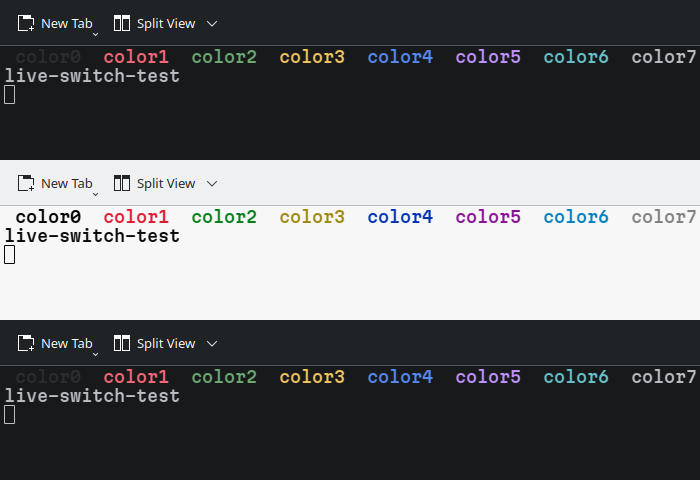
Undo / rollback#
In the same shell as step 2 (or set LIGHT again first), delete the three keys and move the light profile out:
$ kwriteconfig6 --file konsolerc --group LightDarkTheme --key SyncProfileWithSystemTheme --delete
$ kwriteconfig6 --file konsolerc --group LightDarkTheme --key LightThemeProfile --delete
$ kwriteconfig6 --file konsolerc --group LightDarkTheme --key DarkThemeProfile --delete
$ mv ~/.local/share/konsole/"$LIGHT.profile" ~/konsole-backup/
$ kreadconfig6 --file konsolerc --group LightDarkTheme --key SyncProfileWithSystemTheme

$ ls -1 ~/.local/share/konsole/
islands-dark.colorscheme
islands-light.colorscheme
user-default.profile
Expected: SyncProfileWithSystemTheme is empty again, and the light profile has left the profile directory (it stays in ~/konsole-backup/). On copies of my files, konsolerc came out byte-identical to the pre-change one (cmp); the system file /etc/xdg/konsolerc sets none of these keys here, so no deletion marker was written. Copying ~/konsole-backup/konsolerc back gave the same bytes here but also reverts any other konsolerc change made since step 1. I haven't rolled back the live desktop. Restart Konsole afterwards, for the reason in step 7. If step 6 was skipped, put kdeglobals back as step 6 does.
Failure modes#
| Symptom (exact message) | Cause | Fix |
|---|---|---|
Plasma goes light, Qt and GTK apps and Kate follow, Konsole stays dark; kreadconfig6 --file konsolerc --group LightDarkTheme --key SyncProfileWithSystemTheme prints an empty line | the sync is off, as shipped (<default>false</default> in konsole.kcfg) | steps 2 and 3 |
diff of the two profiles prints only 7c7, < Name=user-default, ---, > Name=user-light | both profiles use the same scheme: my dark profile had been rewritten with the light scheme during testing. A window in light mode looks right either way (step 5) | copy the dark profile back from ~/konsole-backup/, run step 2's diff again, then steps 4 and 5 |
after step 5, diff ~/konsole-backup/kdeglobals ~/.config/kdeglobals prints > ColorScheme=BreezeDark | plasma-apply-colorscheme writes the scheme name into ~/.config/kdeglobals | step 6 |
after kwriteconfig6 --file kdeglobals --group General --key ColorScheme --delete, diff prints > ColorScheme[$d] and kreadconfig6 … --key ColorScheme prints an empty line instead of BreezeDark | kdeglobals cascades over ~/.config/kdedefaults/kdeglobals; deleting the key in ~/.config/kdeglobals writes a deletion marker, which also hides the kdedefaults value | copy the step-1 backup back (step 6) |
| delta diffs keep dark backgrounds in a light Konsole | dark = true in ~/.gitconfig turns delta's detection off; the pinned minus-style/plus-style colors keep dark diff backgrounds, and the dark syntax-theme keeps dark highlighting | remove or comment out all of them; I commented them all out together (What follows the switch) |
Row 2 as it looked on my box:
$ cd ~/.local/share/konsole
$ diff user-default.profile user-light.profile
7c7
< Name=user-default
---
> Name=user-light
$ grep ColorScheme user-default.profile user-light.profile
user-default.profile:ColorScheme=islands-light
user-light.profile:ColorScheme=islands-light
Row 4, on copies of my files (~/.config/kdeglobals as it was after the round trip, and the step-1 backup):
$ kreadconfig6 --file kdeglobals --group General --key ColorScheme
BreezeDark
$ kwriteconfig6 --file kdeglobals --group General --key ColorScheme --delete
$ diff ~/konsole-backup/kdeglobals ~/.config/kdeglobals
135a136
> ColorScheme[$d]
$ kreadconfig6 --file kdeglobals --group General --key ColorScheme
What follows the switch, app by app#
Konsole repaints itself, but it can't tell the programs running in it. A terminal program can learn about a theme change while it runs through DEC private mode 2031, and Konsole 26.08.1 doesn't implement it (Vt102Emulation.cpp has no handler for 2031 or its 996/997 reports). It does answer OSC 11, the "what is your background color?" query (SessionController.cpp), so a program that asks at startup gets the current answer. Versions are the ones installed here.
| App | Follows Plasma | What it takes | Evidence here |
|---|---|---|---|
| Konsole 26.08.1, open windows | live | this manual | observed (step 5) |
| Konsole 26.08.1, new windows | at start | this manual | dark mode observed (step 4); light mode and new tabs from source only |
| Kate and other Qt apps | live | nothing | observed |
| GTK apps | live | nothing | observed |
| delta 0.19.1 | each run | nothing pinned: no dark or light, no own minus-style/plus-style colors; for highlighting that switches too, no syntax-theme and no BAT_THEME, which delta falls back to. --detect-dark-light defaults to auto | observed: light diff backgrounds in a light Konsole, once the pins were gone |
| bat 0.26.1 | each run | nothing, as long as no --theme or BAT_THEME pins one: --theme defaults to auto | docs only |
| nvim 0.11.6 | at start | nothing, as long as your config doesn't set background: nvim asks for the background color (OSC 11) at startup; it would also follow live through mode 2031, on a terminal that has it | source |
| Helix 25.07.1 | no | no light/dark theme pair in 25.07.1; master has [theme] dark/light, picked by mode 2031, so on Konsole it would take its fallback, which defaults to the dark theme | docs |
| btop 1.4.7 | not checked | color_theme = "TTY" (a built-in theme) and theme_background = false (the terminal's background shows through) in btop.conf | set here; how it looks not checked |
| JetBrains IDEs | yes, per JetBrains' docs | Settings, Appearance & Behavior, Appearance: "Sync with OS" | docs; here the checkbox was unticked after an IDE upgrade |
| Zed | yes, per Zed's docs | "theme": { "mode": "system", "light": …, "dark": … } in settings.json | set here; docs |
| Firefox | yes | the "System theme — auto" theme | followed when I looked; once, one toolbar preference still read dark, unexplained (not verified); I found no Mozilla page to cite |
Not checked: Telegram's automatic night mode, Emacs, GIMP, Krita, Blender, darktable, Inkscape.
delta follows only when ~/.gitconfig leaves it alone. These were the lines in my [delta] section that kept it dark; I commented them out:
[delta]
[…]
	syntax-theme = "Visual Studio Dark+"
	dark = true
[…]
	minus-style = syntax "#450a15"
	minus-emph-style = syntax "#600818"
	plus-style = syntax "#0b5858"
	plus-emph-style = syntax "#175959"
[…]
Field notes#
- 2026-10-25 18:37, re-run of the file steps — Fedora 44, kf6-kconfig 6.31.0, ImageMagick 7.1.2.34, copies of my files only: The console blocks in Before you start, steps 1–3, 5 and 6, Verify, Undo and Failure modes row 4 come from one run of exactly these commands, in this order and in one shell, against copies of my files under a scratch home directory, with my session's
XDG_CONFIG_DIRSorder. The copies were the pre-changekonsolercand dark profile (the 13:41:59 backups), my two.colorschemefiles,~/.config/kdedefaults/kdeglobals(last written 17:04, before the test) and~/.config/kdeglobalsas saved just before and just after the 17:55 round trip; the pixel check read the three 17:55–17:56 screenshots. No Konsole window opened and no scheme changed during that run. (The Failure modes row 2 block is older: the live files at 16:44.) Step 2 produced a light profile byte-identical to the one I have used since 13:51:57, step 3 akonsolercbyte-identical to my live one, and the undo akonsolercbyte-identical to the pre-change backup (cmpeach). A read of the same key on the live session printedBreezeDark, as in step 5. - 2026-10-25 17:55:57–17:56:05, Fedora 44, Plasma 6.7.5 (plasma-workspace 6.7.5, X11), Konsole 26.08.1, Qt 6.11.2: The live switch. One
konsole --separatewindow, started without--profile, while Plasma was dark (Breeze Dark global theme). I copiedkdeglobalsfirst, then took a screenshot, ranplasma-apply-colorscheme BreezeLight, waited 4 s, took a screenshot, ranplasma-apply-colorscheme BreezeDark, waited 4 s and took a third. Background pixel 24,25,27, then 247,247,247, then 24,25,27; the ANSI colors changed with it. Those values match my two schemes' backgrounds (25,26,28 and 255,255,255) at theirOpacity=0.97; the built-in profile's Breeze scheme (35,38,39, opacity 1) would not, so the sync picked my own light and dark profiles.kdeglobalscame back with one extra line,ColorScheme=BreezeDarkunder[General]; I copied the saved file back, and it is identical to the copy now. - 2026-10-25 17:40, Fedora 44, Plasma 6.7.5 (X11), Konsole 26.08.1: I put the dark profile back from the 13:41:59 backup (byte-identical afterwards). A new
konsole --separatewindow, opened in dark mode, came up dark: background pixel 24,25,27. The dark half had never been tested before this. - 2026-10-25 16:29, Fedora 44, Plasma 6.7.5 (X11), Konsole 26.08.1: When I compared the two profiles, they differed only in
Name=; both pointed atislands-light(the block under Failure modes is the re-run at 16:44). The dark profile's file had last been written at 13:49:17, in the middle of that afternoon's light-mode testing. The copy in my dotfiles repository, committed earlier that day, still saidColorScheme=islands-dark. Every test until then had run in light mode, where two light profiles look the same as a working pair. - 2026-10-25 13:41–13:52, Fedora 44, Plasma 6.7.5 (X11), Konsole 26.08.1, delta 0.19.1, btop 1.4.7: Earlier that day Plasma's automatic switch had turned the desktop light; Qt and GTK apps and Kate followed, Konsole stayed dark. I found the
LightDarkThemekeys by searching the Konsole library withstrings -e l(how that went is in the post linked under Notes). I backed upkonsolercand the dark profile at 13:41:59 and wrote the three keys right after (konsolercwas last written at 13:41:59 and, as of that evening, not since, so my open Konsole windows never rewrote it). The light schemeislands-light(13:48:57) came from the light variant of the Zed theme I use: a small converter script turned itsterminal.ansi.*colors into a.colorscheme, and running it again reproduces the file byte for byte. The light profile was written at 13:51:57. My three screenshots of light test windows, at 13:42:24, 13:49:04 and 13:51:03, all predate that file, so none of them tested this setup. delta: I commented out the dark pins in~/.gitconfig, and the 13:51:03 window showed a delta diff with light backgrounds. btop: I setcolor_theme = "TTY"andtheme_background = false, and haven't looked at it since.
Notes#
- The settings-dialog route, read in the v26.08.1 source and not opened here: Konsole's settings dialog, page General, checkbox "Automatically switch profile based on system theme" (widget
kcfg_SyncProfileWithSystemTheme, bound to the same key). Once that is applied, the Profiles page shows "Set as Light" and "Set as Dark" instead of "Set as Default", and those buttons writeLightThemeProfileandDarkThemeProfile. - How Konsole decides (source:
MainWindow.cpp,ProfileManager.cpp): it asks Qt for the color scheme (QStyleHints::colorScheme).Darkgets the dark profile; anything else, unknown included, gets the light one. It sets that profile on every session of the Konsole process when a window is created and again on eachcolorSchemeChangedsignal. While the sync is on,ProfileManager::defaultProfile(), which new tabs get, returns the light or dark profile instead of theDefaultProfile=one. - The built-in profile, which a misspelled name in step 3 falls back to, uses the
Breezescheme, a dark one (source:Profile.cpp,Breeze.colorscheme; not tried). - Konsole versions: the setting came with commit e4e20bb6 (merged 2026-04-28). The first stable release with it is 26.08.0; the 26.07.80 and 26.07.90 pre-release tags have it too. Older Konsole has no such setting.
- The keys are compiled into Konsole as UTF-16 strings, so plain
stringson the library misses them andstrings -e lfinds them. The story of finding the setting is in Konsole had the switch all along.
Sources#
- Konsole v26.08.1
src/settings/konsole.kcfg— theLightDarkThemegroup, its keys and defaults;UseSingleInstancedefaultfalse - Konsole v26.08.1
src/MainWindow.cpp—applyThemeProfile(), connected tocolorSchemeChanged, run at window creation and on every settings change - Konsole v26.08.1
src/profile/ProfileManager.cpp— light/dark profiles looked up by name with built-in fallback;defaultProfile()following the scheme - Konsole v26.08.1
src/profile/Profile.cpp— defaultColorSchemeof the built-in profile,Breeze;data/color-schemes/Breeze.colorscheme— its dark background - Konsole v26.08.1
src/colorscheme/ColorSchemeManager.cpp— where a scheme name is looked up;data/data.qrc— the bundled schemes - Konsole v26.08.1
src/main.cpp—--separatealways starts a new process - Konsole v26.08.1
src/settings/GeneralSettings.ui— the checkbox;ProfileSettings.cpp— the Set as Light / Set as Dark buttons - Konsole commit e4e20bb6 — "Add automatic profile switching based on system theme", merged 2026-04-28
- Konsole v26.08.1
src/Vt102Emulation.cpp— no handling for mode 2031 or the 996/997 reports;src/session/SessionController.cpp—sendBackgroundColor, the OSC 11 reply - plasma-workspace v6.7.5
kcms/colors/plasma-apply-colorscheme.cpp— the "already set" check and the success message - Contour: Dark and Light Mode detection — the mode 2031 spec
- Neovim
_defaults.luaat v0.11.6 — the OSC 11 query at startup; commit d460928 — mode 2031 support, first released in 0.11.0 - Helix master
themes.md—[theme] dark/light/fallback; PR #14356 — merged after 25.07.1 - delta 0.19.1
--help—--detect-dark-light, defaultauto;src/options/theme.rs—--dark/--lightskip detection, a pinned syntax theme doesn't; the syntax theme falls back toBAT_THEME - bat v0.26.1 CHANGELOG — automatic theme from the terminal's colors, since v0.25.0
- btop v1.4.7
src/btop_config.cpp— theTTYtheme andtheme_background - JetBrains: Appearance settings — "Sync with OS"
- Zed: Appearance —
"mode": "system"